
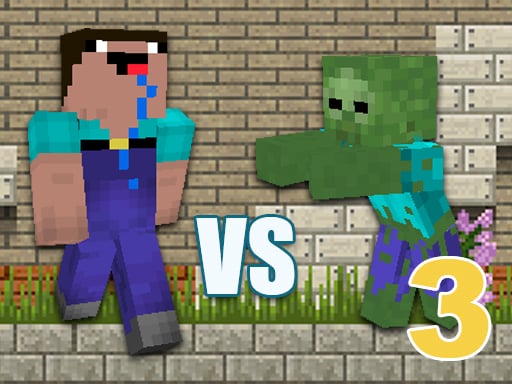
Minecraft Noob vs Zombies 3 delivers one of the smoothest SHOOTING experiences you can enjoy directly in your browser. No downloads, no high-end hardware — just open your browser, hit play, and jump straight into the action.
Minecraft Noob vs. Zombies 3 is a thrilling walkthrough game that will take you on many exciting adventures. As a noob, your objective is to collect resources, hunt for food, craft weapons, and fight against hordes of zombies to survive. Explore the vast and immersive world of Minecraft as you search for rare figurines that will help you on your quest. With an array of weapons and tools at your disposal, you'll need to use your wits and strategic thinking to overcome challenging obstacles and defeat zombie bosses. But be careful, the undead won't go down without a fight! It's up to you to use your skills to fight for your survival and complete the game. Whether you're a fan of Minecraft or just looking for a new adventure, Minecraft Noob vs. Zombies 3 offers a fun and engaging experience that will keep you hooked for hours on end. Download this free walkthrough game today and join the ranks of the ultimate Minecraft survivor! With its exciting gameplay and immersive world, Minecraft Noob vs. Zombies 3 is sure to become your new favorite game. "Noob vs. Zombies" is not an official Mojang app. Minecraft is a trademark of Mojang and is not affiliated with Noob vs. Zombies
Unlike many modern games loaded with installers and microtransactions, Minecraft Noob vs Zombies 3 keeps things pure and accessible. It’s completely free, easy to learn, and respects your time and money. What makes players come back? The core gameplay — nothing else. The community is also welcoming, with players from around the world sharing strategies and enjoying the fun together.
Every session in Minecraft Noob vs Zombies 3 feels fresh. The challenges, your decisions, and the way each round unfolds create a unique experience every time. The more you play, the more you discover. Performance is reliable, loading is quick, and it runs flawlessly even on modest devices.
The controls are intuitive across all devices. Use your mouse for precise clicks on desktop, or tap and swipe naturally on phones and tablets. Within minutes, the controls will feel like second nature.
Quick Start Guide
To start playing Minecraft Noob vs Zombies 3 , simply click the play button above. That's all it takes — no registration, no installation. The game works on all modern browsers and automatically adjusts to fit your screen perfectly.
Controls:
Pro Tips:
Don't worry about mastering everything immediately. Take your time to explore the mechanics and
experiment. The
game provides helpful visual and audio feedback — pay attention to these cues to improve
quickly. Above all,
focus on enjoying the experience.
Troubleshooting:
Ensure JavaScript is enabled and your browser supports HTML5 Canvas. For the best experience on
mobile, a Wi-Fi
connection is recommended over cellular. If something seems off, a simple page refresh usually
solves the issue.
 PUZZLE
 PUZZLE
 PUZZLE
 PUZZLE
 HYPERCASUAL
 HYPERCASUAL
 BOY
BOY
 ACTION
 SOCCER
 SOCCER
 RACING
 HYPERCASUAL
 BOY
BOY
 BOY
BOY
 ADVENTURE
 ADVENTURE
 3D
3D
 3D
3D